Office 2024 和 Office LTSC 2024 有哪些新功能?
在Office 2024和Office LTSC 2024中,你会发现多项新功能,包括Excel中的几个新函数、改进的无障碍功能、Word中更好的会话恢复、Access中的新功能,以及一个全新且更现代的设计,将Office 2024融为一体。
重要
- 以下列出的某些功能并非同时包含在面向消费者的 Office 2024 和面向商业客户的 Office LTSC 2024 中。标注为“LTSC”的功能仅对商业用户可用。
- 如果你通过 Microsoft 365(或 Office 365)计划拥有订阅,这与 Office 2024 或 Office LTSC 2024 是分开的。例如,如果你已经在使用 Microsoft 365,或者你的组织已向组织中的用户部署了 Microsoft 365 企业应用版,则你不需要 Office 2024 或 Office LTSC 2024。你的 Microsoft 365 订阅已具备 Office 2024 或 Office LTSC 2024 中的所有功能,此外还具备 Office 2024 或 Office LTSC 2024 中未包含的许多其他功能。

- Windows
- macOS
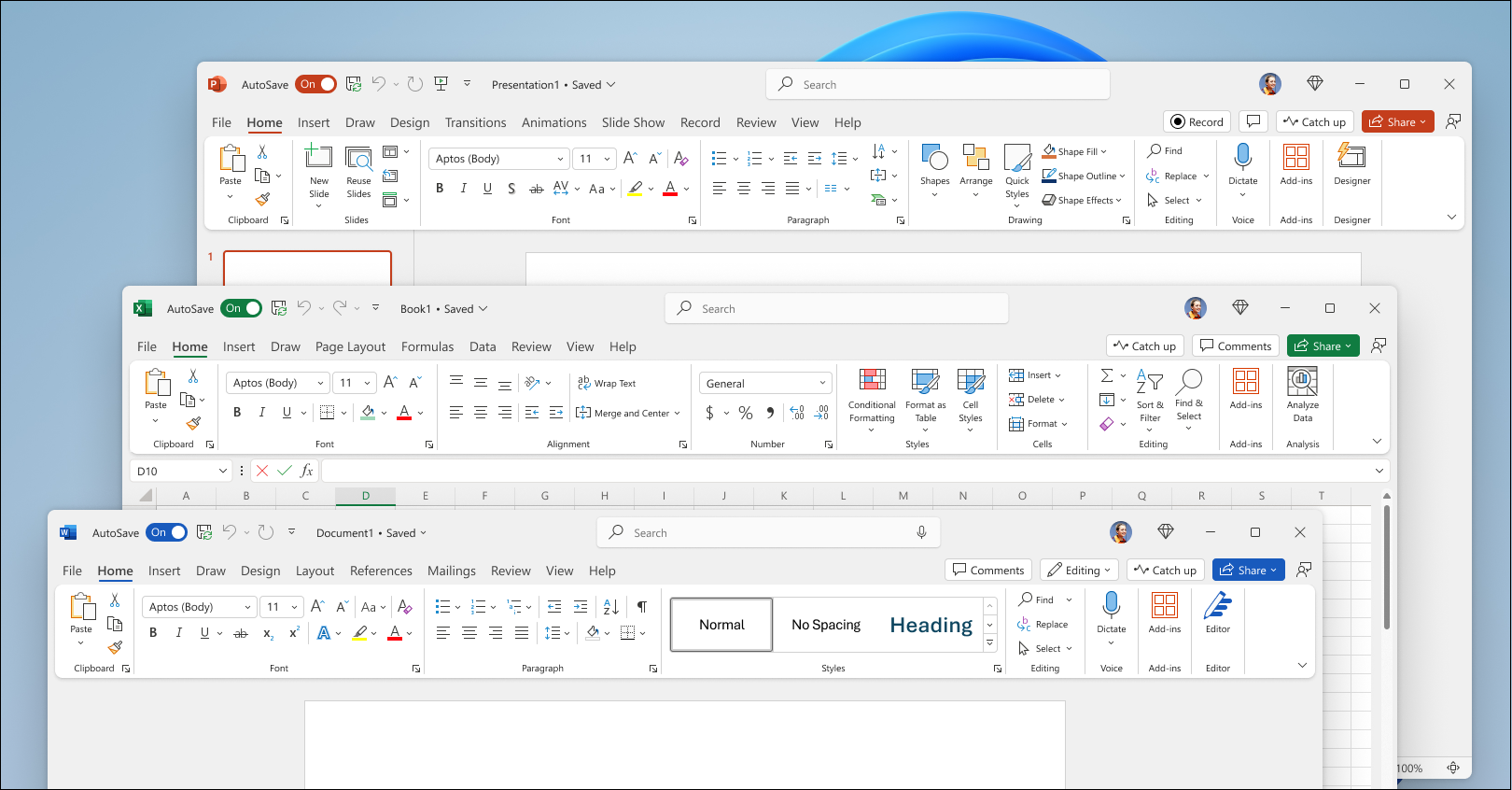
新的默认 Office 主题
根据像您这样的用户的反馈,Office 2024 在 Office 应用内部及不同 Office 应用之间提供了更自然、更一致的体验。这一全新外观运用了 Fluent Design 设计原则,在所有应用程序中带来直观且熟悉的体验。它在 Windows 11 上表现出色,同时也增强了 Windows 10 上的用户体验。
查看 Office 的新外观
新增功能:
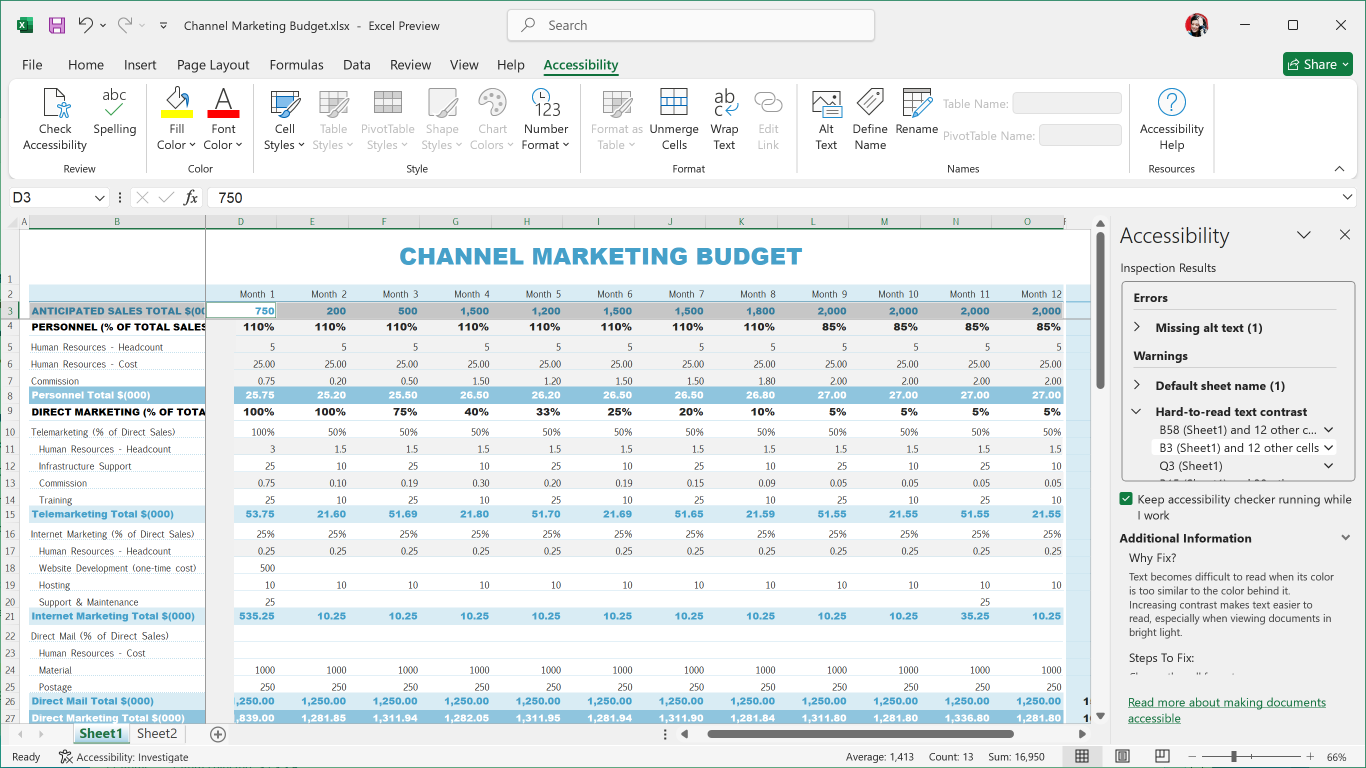
改进的无障碍工具
Office LTSC 2024 添加了多项新的和改进的功能,使你的文档、演示文稿、工作簿和电子邮件更易于所有人访问。
查看辅助功能功能区
新增功能:
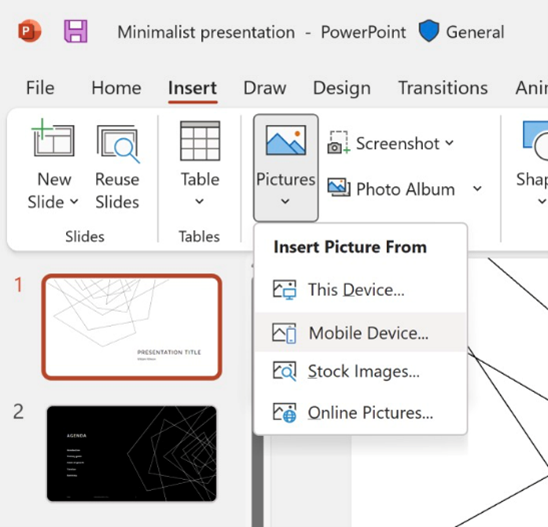
从移动设备插入图片
过去,将图片从手机传输到电脑需要多个步骤,但现在在 Office LTSC 2024 中,你可以使用 Android 设备直接将图片插入到内容中。
请参阅:将 Android 手机中的照片插入到适用于 Windows 的 Word、Excel 和 PowerPoint 文件中
新增功能:
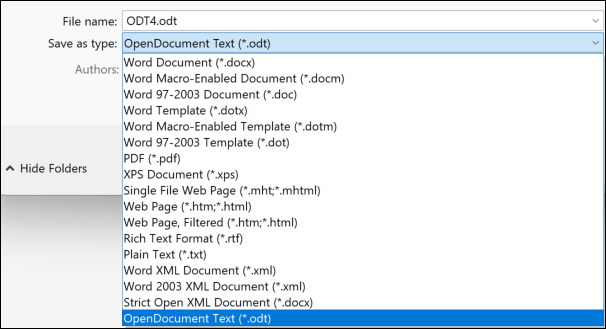
支持 OpenDocument 格式 (ODF) 1.4
我们现在支持 OpenDocument 格式 (ODF) 1.4。ODF 1.4 规范新增了对许多新功能的支持。
请参阅 Microsoft 365 应用现支持 OpenDocument 格式 1.4
新增功能:
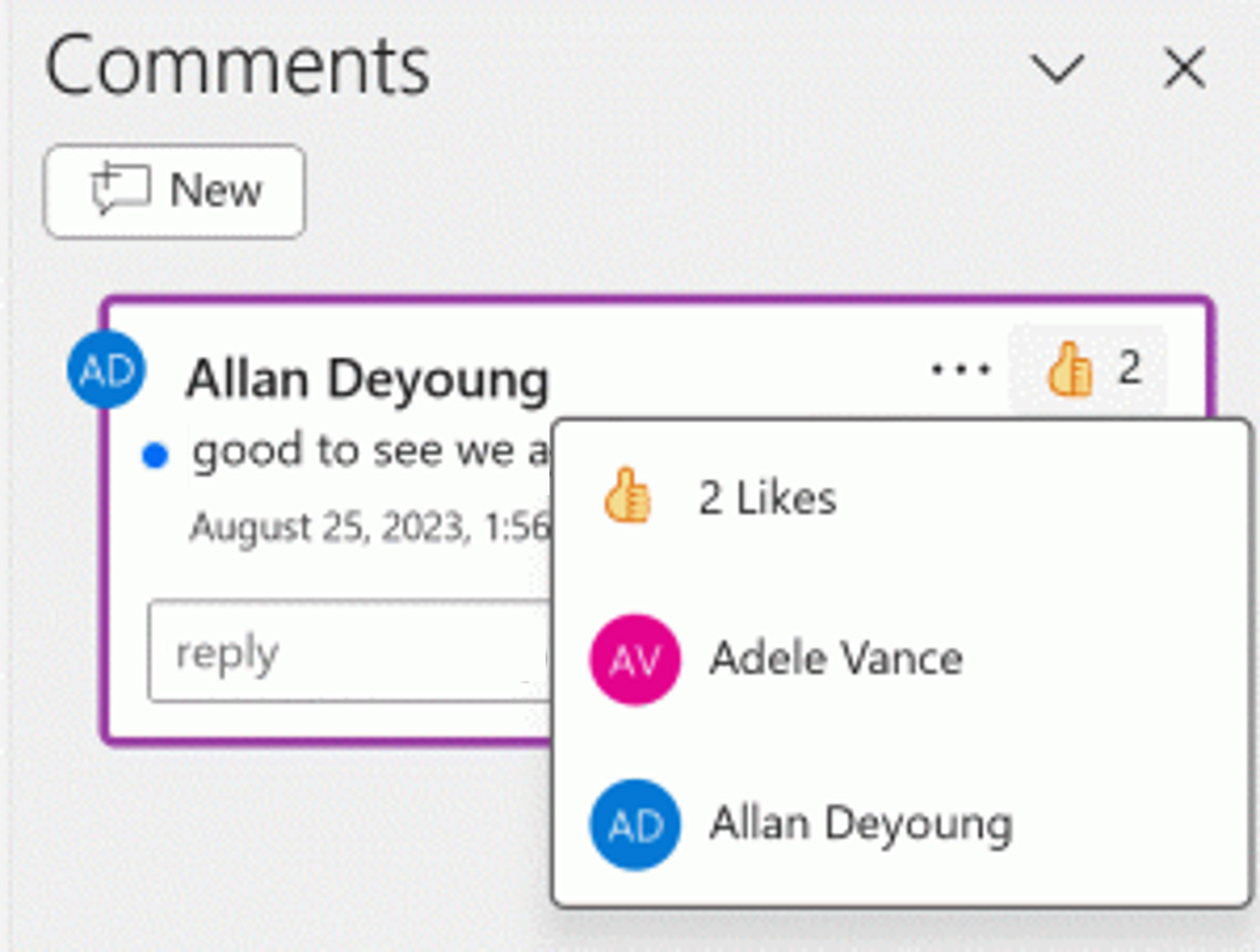
使用蓝点快速识别新评论或新回复,并通过点赞表达您对评论的支持。
请参阅在演示文稿中添加、更改、隐藏或删除批注
新增功能:
使用动态数组的动态图表
在 Excel 2024 中,你现在可以在图表中引用动态数组,以帮助可视化可变长度的数据集。当数组重新计算时,图表会自动更新以捕获所有数据,而不是固定为特定数量的数据点。
请参阅:在图形对象中动态显示单元格或区域的内容
新增功能:
文本和数组函数
Excel 2024 现在新增了 14 个文本和数组函数,旨在帮助你处理工作表中的文本和数组。这些函数使提取和拆分文本字符串变得更加容易,并让你能够轻松地组合、重塑、调整大小和选择数组。
请参阅“新增文本和数组函数”
新增功能:
新增 IMAGE 函数
现在,在 Excel 2024 中,你可以使用复制和粘贴向工作簿添加图片,也可以使用 IMAGE 函数从网页中获取图片。你还可以在 Excel 表格中轻松地移动、调整大小、排序和筛选,而图片不会随之移动。
请参阅:在 Excel 中插入单元格内图片
新增功能:
更快的工作簿
Excel 2024 工作簿的速度和稳定性已得到改进,减少了同时打开多个包含独立计算的工作簿时出现的延迟和卡顿。
新增功能:
使用 Cameo 演示
借助 Cameo,你可以将实时摄像头画面直接插入 PowerPoint 幻灯片。然后,你可以像对图片或其他对象一样,对摄像头画面应用相同的效果,包括格式、切换和样式。
请参阅:使用 cameo 进行演示
New in:
Create a video in Recording Studio
Record your PowerPoint presentation—or just a single slide—and capture voice, ink gestures, and your video presence. Export your recorded presentation as a video file and play it for your audience.
See Record your presentation
New in:
Add Microsoft Stream (on SharePoint) videos to the presentation to enhance and enrich your storytelling.
See Insert a video from YouTube or another site
New in:
Add closed captions for video and audio
You can now add closed captions or subtitles to videos and audio files in your presentations. Adding closed captions makes your presentation accessible to a larger audience, including people with hearing disabilities and those who speak languages other than the one in your video.
See Add closed captions or subtitles to media in PowerPoint
New in:
Improved search for email, calendars, and contacts
Outlook 2024 的搜索功能已新增改进,可增强邮件、附件、联系人和日历条目的搜索效果,以便您在输入搜索内容时,系统会显示最相关的建议。
查看如何在 Outlook 中搜索
New in:
More options for meeting creation
Outlook 2024 gives users more options while creating or managing meetings helping you carve out breaks between calls by automatically shortening meetings depending on their length.
See End meetings early or start late
New in:
Recover your Word session
When Word 2024 closes unexpectedly before you save your most recent changes, Word automatically opens all the documents you had open when the process closed, allowing you to continue where you left off.
See Recover your Word files and documents
New in:
Improved Draw tab and ink features
OneNote LTSC 2024 has many new features and updates to existing tools to make your inking and Draw tab experience more robust and customizable. Now your ink will render instantly when drawn with your Surface pen and look just as good as traditional ink on paper. OneNote LTSC 2024 also now has more color and size options for your drawing tools, as well as better organization of the tools for easier access.
See New Draw tab and ink tools in OneNote on Windows
New in:
Access Dataverse Connector with Power Platform
Unlock new capabilities organizations need and want like mobile solutions and Microsoft Teams integration. Keep the value and ease of use of Access together with the value of cloud-based storage.
See Get started: Migrate Access data to Dataverse
New in:
Even more shapes, stencils, and templates
Visio 2024 has even more shapes, stencils, and templates to help you create diagrams. Visio Standard 2024 now brings many new icons, sticky notes to brainstorm, and a plethora of infographics like pictograms and To-Do-Lists to name a few. Visio Professional 2024 includes all the added content from Standard and includes 10+ new Azure stencils, and more network and software content like Kubernetes Shapes and Yourdon-Coad Notations.
See Find more shapes and stencils
New in:
What’s new in your favorite Microsoft 365 app
New default Office theme
Based on feedback from user like you, Office 2024 for Mac has a more natural and consistent experience within and between your Office apps. This new look applies Fluent Design principles to deliver an intuitive, familiar experience across all your applications.
New in:
Improved accessibility tools
Office LTSC for Mac 2024 has added several new and improved features to make your documents, slideshows, workbooks, and emails more accessible for everyone.
See Accessibility Ribbon
New in:
Insert a picture from a mobile device
It used to take several steps to transfer images from your phone to computer, but now you can use your Android device to insert pictures directly into your content in Office LTSC 2024 for Mac.
See Insert photos from your Android phone into Word, Excel, and PowerPoint for Windows files
New in:
Support for OpenDocument Format (ODF) 1.4
We now include support for the OpenDocument format (ODF) 1.4. The ODF 1.4 specification adds support for many new features.
See Microsoft 365 apps now support OpenDocument Format 1.4
New in:
Quickly identify new comments or new replies with the blue dot and show your support to a comment with a Like reaction.
See Add, change, hide, or delete comments in a presentation
New in:
Dynamic charts with dynamic arrays
Now in in Excel 2024 for Mac , you can now reference Dynamic Arrays in charts to help visualize datasets of variable length. Charts automatically update to capture all data when the array recalculates, rather than being fixed to a specific number of data points.
See Dynamically display the contents of a cell or range in a graphic object
New in:
Text and array functions
There are now 14 new text and array functions in Excel 2024 for Mac that are designed to help you manipulate text and arrays in your worksheets. These functions make it easier to extract and split text strings and enable you to combine, reshape, resize, and select arrays with ease.
See Announcing New Text and Array Functions
New in:
New IMAGE function
Now in Excel 2024 for Mac, you can add pictures to your workbooks using copy and paste or you can use the IMAGE function to pull pictures from the web. You can also easily move, resize, sort, and filter within an Excel table without the image moving around.
See Insert Picture in-cell in Excel
New in:
Faster workbooks
The speed and stability of Excel 2024 for Mac workbooks has been improved, reducing the delays and hang-ups that arise when multiple workbooks with independent calculations are open at the same time.
New in:
Present with cameo
With cameo, you can insert your live camera feed directly on a PowerPoint slide. You can then apply the same effects to your camera feed as you can to a picture or other object, including formatting, transitions, and styles.
See Presenting with cameo
New in:
Create a video in Recording Studio
Record your PowerPoint presentation—or just a single slide—and capture voice, ink gestures, and your video presence. Export your recorded presentation as a video file and play it for your audience.
See Record your presentation
New in:
Add Microsoft Stream (on SharePoint) videos to the presentation to enhance and enrich your storytelling.
See Insert a video from YouTube or another site
New in:
Add closed captions for video and audio
Now in PowerPoint LTSC for Mac 2024 , you can add closed captions or subtitles to videos and audio files in your presentations. Adding closed captions makes your presentation accessible to a larger audience, including people with hearing disabilities and those who speak languages other than the one in your video.
See Add closed captions or subtitles to media in PowerPoint
New in:
Send a scheduled email
Now in Outlook 2024 for Mac, you can schedule when you want your emails to be delivered. Just select a day and time and forget about it, no need to be online for the email to be delivered.
See Schedule send for Outlook on Mac
New in:
Focus your inbox
Outlook 2024 for Mac includes Focused Inbox, which separates your inbox into two tabs—Focused and Other. You’ll find your most important email messages on the Focused tab while the rest remain easily accessible—but out of the way—on the Other tab.
See Focused inbox in Outlook for Mac
New in:
Recover your Word session
When Word 2024 for Mac closes unexpectedly before you save your most recent changes, Word automatically opens all the documents you had open when the process closed, allowing you to continue where you left off.
See Recover your Word files and documents
New in:
What’s new in your favorite Microsoft 365 app